
You can identify most phishing emails by checking nine things: the real sender address, urgency, a generic greeting, links that don’t match their text, lookalike domains, unexpected attachments, requests for credentials or payment, changes to bank details, and failed authentication results in the headers. When two or more appear together, treat the message as phishing and verify it another way.
Phishing is a way of deceiving people into handing over usernames, passwords, card details, network tokens and other confidential information. Both individuals and organisations are targets. People remain the weak point that attackers aim for: the Verizon 2025 Data Breach Investigations Report found that the human element was involved in around 60% of breaches.
The good news is that phishing emails tend to give themselves away if you know where to look. Here is what to examine.
9 signs of a phishing email
1. An unofficial “From” address
Look at the actual address, not just the display name. Fraudsters use addresses that are similar to, but not the same as, a company’s official one, or free webmail accounts with the company’s name in them, such as “yourbank.alerts@gmail.com”. On a phone, tap the sender name to see the full address.

2. Urgent action required
Fraudsters add urgent calls to action so you react before you think. Be wary of phrases like “your account subscription is about to expire”, “your account has been compromised” or “urgent action required”. The attacker is using your worry to rush you into giving away information.
3. A generic greeting
Bulk phishing goes out to thousands of people at once. The sender may have your email address but not your name, so you get “Dear Customer” or “Dear Member”. A targeted spear phishing email may use your name, so a personal greeting doesn’t prove a message is real.
4. Links that hide their real destination
The link text might say “Click here” or show the company’s real address, while the actual link goes somewhere else. On a computer, hover over the link and read the address that appears at the bottom of the window. On a phone, press and hold the link to preview it without opening it.
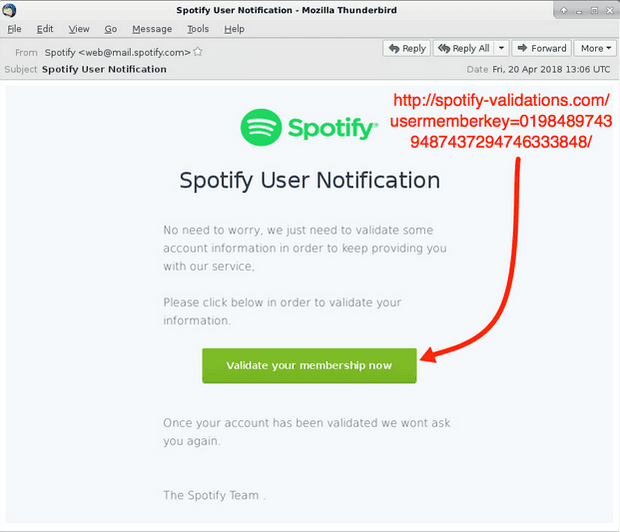
5. Lookalike or typo domains
Some phishing sites use domains registered to trick you into believing you are on the genuine site. The name looks very close to the real one but with a subtle difference: a missing or doubled letter, “rn” in place of “m”, an added hyphen or word, or a different ending such as .co instead of .com. Compare the domain carefully with one you know is genuine.
6. Unexpected attachments
Treat any attachment you weren’t expecting with suspicion, especially zipped files, HTML files, disk images and Office documents that ask you to “enable editing” or “enable content”. Invoices, voicemails, scanned documents and shipping notices are favourite disguises.
7. Requests for credentials, OTPs or payment
Legitimate organisations don’t ask you to send your password, OTP or card details by email, and they don’t send you a login link to “confirm your identity” out of the blue. Any email that ends with you typing a password or making a payment deserves a second look.
8. A change of bank details or a secret request
“Our bank account has changed, please pay the attached invoice to the new details.” “I’m in a meeting, can you buy gift cards and send me the codes?” These are the hallmarks of business email compromise. Always confirm by phone on a number you already have.
9. Failed authentication in the headers
Mail providers record whether a message passed sender checks. In Gmail, open the three-dot menu and choose “Show original”. In Outlook, view the message source or headers. Look for the Authentication-Results line and the spf, dkim and dmarc results. A “fail” for a message claiming to be from a big brand is a strong warning sign. A “pass” only proves the mail came from the domain shown, which might be a lookalike.
What to do when you spot one
- Don’t click, reply or open attachments.
- Report it. Use the “report phishing” button in your mail client, or forward it to your security team if you are at work.
- Verify independently. If the message might be real, contact the company through its app, its website typed by hand, or a phone number you already know.
- Delete it once reported.
If you already clicked and entered a password, change it straight away from a trusted device and tell your IT team. If you shared card details or an OTP, call your bank at once.
How organisations can stop phishing emails reaching staff
Spotting phishing shouldn’t depend on staff alone. Several controls cut the volume before it reaches anyone:
- Email authentication for your own domains. Publish SPF and DKIM and enforce DMARC so criminals can’t send mail that uses your exact domain. TIKAJ’s DMARC+ helps organisations get to an enforced policy, and our blog explains what DMARC is and why it matters.
- Warnings for external senders and new domains. A banner on mail from outside the company, or from a domain registered recently, makes impersonation easier to spot.
- A one-click report button with fast feedback, so staff know their reports are read.
- Takedown of lookalike domains that target your staff or customers.
Phishing emails often rely on a forged sender. To understand where spoofing ends and phishing begins, read the difference between phishing and spoofing.
FAQ
What is the quickest way to tell if an email is phishing?
Check two things: the full sender address and the real destination of any link, by hovering or long-pressing. If either doesn’t match the organisation’s genuine domain, it is almost certainly phishing. If the message also pressures you to act quickly or asks for a password, OTP or payment, don’t act on it.
Can a phishing email come from a real address?
Yes. If an attacker has taken over a genuine mailbox, such as a supplier’s or a colleague’s, the message comes from a real address and passes every authentication check. That is why unusual requests, especially about payments or bank details, should always be confirmed by phone, however legitimate the sender looks.
Is it safe to open a phishing email?
Opening and reading a phishing email in a modern, updated mail client is usually low risk. The danger comes from clicking links, opening attachments, enabling content in documents or replying. Opening it can tell the sender your address is active if images load, so report and delete it rather than interacting with it.