
Phishing is a scam in which an attacker pretends to be a trusted person or organisation to trick you into giving up passwords, card details, OTPs or money, or into installing malware. It arrives by email, text message, phone call, social media or a fake website. Preventing it takes a mix of habits, account security and fast removal of the fake sites.
Phishing works because it attacks people rather than software. A firewall can’t stop an employee from typing a password into a page that looks exactly like the company’s login screen. That is why it remains the most reported cybercrime: the FBI’s Internet Crime Complaint Center received 191,561 phishing and spoofing complaints in 2025, more than any other category, according to its 2025 Internet Crime Report.
How a phishing attack works, step by step
Most phishing campaigns follow the same six steps:
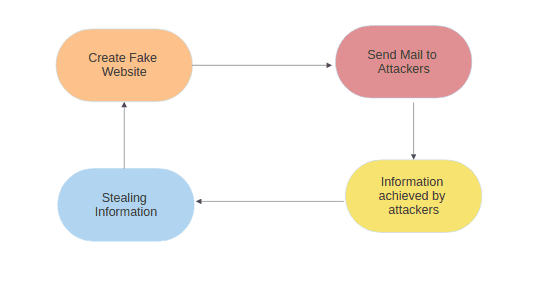
- The attacker gathers targets. Email addresses and phone numbers come from data breaches, company websites, social media or lists bought on criminal forums.
- They build a fake page. It copies the look of a real login or payment page, often on a lookalike domain or a hacked website.
- They send the lure. An email or message with a link to the fake page, written to create urgency: a blocked account, an unpaid invoice, a parcel on hold.
- The victim follows the link because the message seems routine or alarming enough to act on quickly.
- The victim enters credentials or card details and submits them.
- The attacker uses the data, logging into the account, moving money, selling access or launching the next attack from the victim’s mailbox.
The main types of phishing
- Email phishing. Bulk messages that impersonate a well-known brand.
- Spear phishing. Messages tailored to one person or team, using names, projects or suppliers they recognise.
- Business email compromise. A spoofed or hijacked executive or supplier account requests a payment or a change of bank details.
- Smishing and vishing. The same scam over SMS or a phone call, often asking for an OTP.
- Clone phishing. A real email you received earlier is copied, with the link or attachment swapped for a malicious one.
- Brand impersonation sites and apps. Fake websites, social media pages or apps that use a company’s name and logo to collect customer data.
We go through each in more detail in 10 types of phishing attacks.
Why phishing is still growing
The tools are cheap. Phishing kits that copy popular login pages are sold ready-made, domains cost very little, and free certificates give fake sites the same padlock as real ones. Generative AI has also removed the clumsy grammar that used to give many scams away.
The volume shows it. The Anti-Phishing Working Group counted 971,181 phishing attacks in the first quarter of 2026, up 13.8% from the previous quarter, in its Q1 2026 Phishing Activity Trends Report. Telecom and SaaS or webmail brands were the most targeted.
How to recognise a phishing attempt
Watch for these signals in any message:
- The sender’s domain doesn’t match the organisation’s real domain, even if the display name does.
- The message pushes you to act now: account suspended, payment failed, legal action.
- A link’s text says one thing but the address underneath points somewhere else.
- You are asked for a password, OTP, PIN or card details by email, text or phone.
- An attachment you weren’t expecting, especially a zipped file, an HTML file or a document asking you to “enable content”.
- A request to change payment details or keep something confidential from colleagues.
Prevention: what to do
For individuals
- Turn on two-step verification everywhere, and use passkeys or an authenticator app where offered.
- Use a password manager. It won’t autofill on a fake domain, which is a useful warning.
- Go to sites by typing the address or using the app, not by tapping links in messages.
- Never share an OTP, even with someone who says they are from your bank.
- Report phishing using your mail client’s report button. In India, report fraud attempts at cybercrime.gov.in and call 1930 at once if money has gone.
For organisations
- Authenticate your email. Publish SPF, DKIM and DMARC and move DMARC to a reject policy, so nobody else can send mail that uses your exact domain. Our DMARC guide explains the steps.
- Use phishing-resistant MFA for admins, finance and remote access.
- Make reporting easy. Give staff a one-click report button and respond to reports within minutes, not days.
- Train with realistic simulations, focused on the lures your staff actually receive, and measure reporting rates rather than just click rates.
- Monitor and take down impersonation. DMARC can’t stop lookalike domains, fake social profiles or cloned apps. These have to be found and removed. TIKAJ’s anti-phishing service covers detection through to site takedown, and TIKAJ and its platform Hunto handle more than 100,000 takedowns a year for over 150 enterprise customers.
What to do if you clicked a phishing link
- Disconnect from the page and don’t enter anything else.
- If you entered a password, change it at once from a device you trust, and change it anywhere else you reused it.
- If you shared card or bank details or an OTP, call your bank immediately to block the card or account.
- Check your email for new forwarding rules and your accounts for unknown signed-in devices.
- At work, tell your security team straight away. Minutes matter for containment.
FAQ
What is phishing in simple words?
Phishing is when a criminal pretends to be someone you trust, such as your bank, a delivery company or your boss, to trick you into handing over a password, card details, an OTP or money. It usually arrives as an email, text message or phone call, and often links to a fake website that copies a real one.
Why is it called phishing?
The name is a play on “fishing”. Attackers cast out lures, such as fake emails and messages, and wait for someone to bite. The “ph” spelling comes from early hacker slang, where it echoed “phreaking”, the practice of manipulating telephone systems. The term has been in use since the mid-1990s.
Can phishing be stopped completely?
No single control stops it, because it targets human judgement. You can cut it sharply by combining email authentication, phishing-resistant MFA, staff who report suspicious messages quickly, and fast takedown of fake sites and lookalike domains. The goal is to make each attack fail early and cost the attacker more than it earns.